NOAA Weather Unofficial (Pro)
- 4.8
- Rating
- 100.00K
- Installs
- $1.99
- Price

 Analysis by App-foxy
I usually reach for a weather app when I need a quick decision rather than a pretty forecast: should I leave now, postpone a walk, cover something outside, or expect a difficult drive? NOAA Weather Unofficial (Pro) takes that practical approach. It is a paid weather app from Granite Apps, built around NOAA forecasts and radar for the user’s exact location. After using it as a day-to-day forecast tool, I found it most appealing when I wanted direct information instead of a crowded feed full of lifestyle content.
The app costs $1.99, carries an Everyone content rating, and currently runs at version 2.18.1. It has been available since February 22, 2012, which gives it a much longer history than many short-lived weather utilities. Its average rating is 4.8 from around 18 thousand ratings, with more than 100 thousand installs. Those figures suggest that it has built a loyal audience, but they do not remove the need to understand what kind of weather experience it offers. This is not the right pick for everyone, especially if you want a highly visual, international weather platform.
How NOAA Weather Unofficial (Pro) feels in everyday use
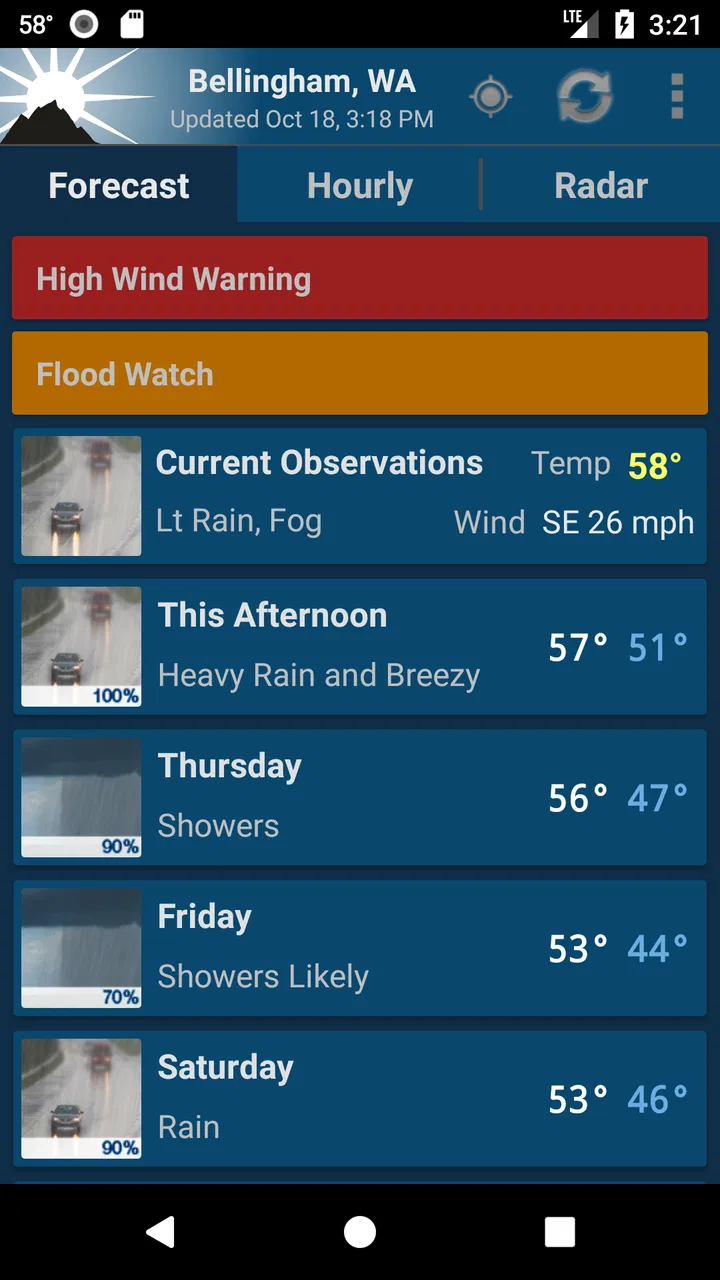
The main strength is focus. Instead of making me work through entertainment cards or promotional panels, the app is centered on forecast information and radar. That makes it useful when I am checking conditions several times during a busy day. I can look at the forecast for the place that matters to me, glance at radar when rain is nearby, and make a decision without turning the process into a long browsing session.
You May Also Like

 Blood Strike: 2.5 Anniversary
Blood Strike’s Loadouts Turn Every Drop Into a Tactical Gamble
A close look at Blood Strike’s custom loadouts: how fast access to signature weapons reshapes its battle royale rhythm, rewards preparation, and narrows the gap between fights.

 Pandora - Music & Podcasts
Pandora’s Music Is Easy to Start, but Harder to Recover
Pandora’s strength is its low-effort path from a seed to a station. Its weak spot is how much confidence it asks you to place in connection, setup, and quiet recovery.

 8 Ball Pool
 Is Built on Rivalries, Rematches, and Routine
A close look at the rivalries, rematches, shared routines, and unanswered safety questions that turn a quick pool match into a persistent mobile community.

 Samsung Music
’s Quiet Strength Is Playing What You Already Own
Its reach comes less from spectacle than from dependable access to a personal library. That simplicity is both the app’s strongest retention engine and its ceiling.

 AccuWeather: Weather Radar
AccuWeather Review: A Quick, Clear Forecast for Everyday Decisions
For everyday plans, the best forecast is the one you can understand quickly. AccuWeather makes rain timing, radar, and local conditions easy to act on, with a few trade-offs.

 Hill Climb Racing
Why Hill Climb Racing Still Turns Crashes Into One More Run
A tiny car, a bumpy hill and one more upgrade: Hill Climb Racing keeps resurfacing because its simple chaos makes every near-miss feel personal.
More From Our News Desk



That exact-location emphasis is particularly valuable in places where weather changes over a short distance. A general city forecast can be misleading if I live outside the center, work near a different part of town, or travel between neighboring communities. I would still treat any forecast as guidance rather than a promise, but starting with the location I actually care about is a meaningful advantage over simply typing a large nearby city into a generic weather service.
In a realistic morning routine, I might check the app before leaving for work, then open radar before heading home if clouds have built up. The first check answers the broad question—what kind of day is ahead—while the second helps with timing. That division is important: a forecast can tell me that rain is likely, but radar is more useful when I am deciding whether to leave immediately or wait a little longer.
The best reason to use this app is its decision-making workflow: forecast first, radar second, action third. It is simple, but it prevents a common mistake with weather apps: treating a single temperature number as the whole story. Wind, precipitation timing, and the movement of a weather system often matter more than whether the day is a few degrees warmer or cooler than expected.
A practical fit for NOAA-focused users
People who already trust NOAA information will probably understand the appeal quickly. The app puts NOAA-based weather material at the center rather than presenting it as one source among many. That can make the experience feel more consistent for users who prefer an official forecasting source and want a compact way to consult it.
I also see value for users who dislike constantly changing interfaces. Weather apps often redesign themselves around maps, videos, news panels, alerts, or advertising. A focused NOAA utility has a different personality: it is closer to a reference tool. That is useful for someone who checks weather because they need to plan outdoor work, commuting, errands, gardening, or travel—not because they want to spend time exploring weather content.
The trade-off is that a focused tool may feel less welcoming to a casual user. If you want animated scenes, broad lifestyle advice, polished visual storytelling, or a large international forecasting ecosystem, this app may seem plain beside mainstream alternatives. I would not choose it solely because it has a high rating. I would choose it because its NOAA-centered purpose matches how I want to check weather.
What the current version means for established users
Version 2.18.1 shows that the app is still presented as a maintained product rather than an abandoned utility. The release history stretching back to 2012 also matters: long-term users are not evaluating a brand-new experiment, but a weather tool that has remained available through many changes in mobile habits and operating systems.
That does not let me claim that every update introduced a particular feature, redesigned a specific screen, or solved a named problem. Those details should not be guessed. What I can say is that the current version is the one prospective users should judge, while existing users can reasonably view the app as an established tool with continuing relevance. The important question is whether its current NOAA-and-radar workflow still suits them, not whether it follows the visual style of newer weather products.
For someone upgrading from an older phone, the minimum operating-system requirement is Android 6.0 or later. That makes the app accessible to many older Android devices, although compatibility alone does not guarantee that every device will feel equally quick or comfortable. Screen size, hardware age, and the way a device handles location-based apps can all affect the experience.
Existing users should also remember that familiarity is one of the app’s strengths. If I have already built a habit around checking this particular forecast and radar presentation, changing to a completely different weather service may create more friction than expected. Weather decisions are often made quickly, and knowing where information appears can be more valuable than having a longer feature list.
Three ways I would use it beyond a quick temperature check
First, I would use the radar as a timing tool rather than as a decorative map. Before a bike ride or outdoor job, I would check whether a rain area is moving toward my location and compare that with the broader forecast. Radar does not guarantee what will happen at one precise address, but it gives me a better basis for deciding whether to carry rain gear, shorten the activity, or wait.
Second, I would use the exact-location approach when moving between nearby places. A forecast for home may not describe conditions at a worksite, school, campsite, or relative’s house a short distance away. Checking the destination separately can expose a difference that a single city forecast hides. This is especially useful when local geography affects rain or temperature.
Third, I would use the app to build a repeatable check before weather-sensitive tasks. For example, before painting outdoors, mowing, photographing an event, or planning a long walk, I would look at the forecast early and then revisit radar closer to departure. The useful insight is not simply “check the weather twice”; it is to use the forecast for planning and radar for immediate timing, because the two views answer different questions.
These habits also reveal a limitation. A weather app cannot replace judgment about local conditions, rapidly developing storms, road surfaces, or what is happening outside the window. I would not use any forecast as permission to ignore official emergency guidance. NOAA information is valuable, but it is still part of a broader decision, especially during severe weather.
Where it compares well with ordinary alternatives
Compared with a general phone weather widget, this app offers a more deliberate way to inspect forecast information and radar. A widget is excellent for a glance at the temperature, but it often encourages a shallow check. NOAA Weather Unofficial (Pro) is more useful when I need to investigate conditions rather than merely notice them.
Compared with large commercial weather apps, its appeal is restraint. Many alternatives combine forecasts with news, advertising, videos, health indexes, maps, and personalized recommendations. That can be helpful for people who want one broad information hub, but it can also make a simple question harder to answer. I prefer this app when the question is, “What is happening near my location, and should I change my plan?”
On the other hand, a mainstream alternative may be better for international travel, polished visualizations, extensive location management, or a more beginner-friendly presentation. If I were planning a trip across several countries, I would first verify that the service I chose covered those destinations in the way I needed. This NOAA-focused app makes the most sense for users whose weather needs align with its source and intended geographic context.
The paid price is another point of comparison. At $1.99, the cost is small, but it still changes the decision. Someone who only wants a temperature on the lock screen may reasonably prefer a free built-in option. Someone who checks radar often and values a dedicated NOAA-oriented tool may find the one-time purchase easier to justify than an app designed around a busier commercial experience.
Remaining gaps and points of friction
The biggest potential gap is presentation. A focused weather utility may not satisfy people who expect rich visual explanations or a highly polished dashboard. I would not call that automatically a flaw, because simplicity is part of the appeal, but it does mean the app rewards users who know what information they want.
Another consideration is source preference. NOAA is a strong reason to choose this app, but it is also a reason to skip it if you specifically want a different forecasting provider or a broader blend of international sources. Forecasts can vary between services, and users who compare several models may find a single-source approach less flexible.
Location accuracy is also worth treating realistically. An app can target the correct place, but the usefulness of the result still depends on how precisely the location is selected and how representative the forecast is of the immediate surroundings. For a rural property, a valley, a coastline, or a mountainous area, conditions can differ from the nearest reporting point. I would check the location carefully instead of assuming that “exact location” means perfect street-level prediction.
Finally, the app may not be ideal for someone who wants the weather to be explained in plain-language recommendations. I like making my own decision from forecast and radar information, but another user may prefer a service that says whether conditions are comfortable for running, safe for driving, or suitable for outdoor plans. That convenience can be useful, even if it makes the experience less direct.
What I would watch before choosing it
For new users, I would pay attention to how quickly the app fits into a real routine. Can I identify my location easily? Can I understand the forecast without repeatedly searching for basic details? Does the radar help me answer timing questions, or do I prefer a simpler summary? These are better tests than comparing screenshots or counting features.
I would also consider how often I need weather information. If I check conditions only occasionally, the price may be harder to justify than a free alternative. If weather affects my commute, outdoor work, exercise, travel, or family plans several times a week, a dedicated NOAA-based tool becomes more sensible. The value comes from repeated decisions, not from owning another icon on the phone.
Users should keep their expectations grounded as the app evolves. Version 2.18.1 is the current reference point, while future changes may improve the experience or alter familiar workflows. I would welcome improvements that make radar and location selection clearer without turning the app into a crowded portal. For existing users, the most important thing to watch is whether the focused character remains intact.
My final recommendation
I recommend NOAA Weather Unofficial (Pro) to Android users who want a straightforward NOAA forecast and radar tool centered on their location. Granite Apps has kept this weather app available for many years, and its current version gives it the feel of an established utility rather than a novelty. The strong average rating and substantial user base support that impression, although my recommendation still depends on matching the app to your habits.
I would choose it for commuting, outdoor planning, local rain timing, and regular forecast checks where direct information matters more than entertainment. I would skip it if I wanted a feature-packed international weather platform, a highly visual interface, or automatic lifestyle recommendations. The paid price is modest, but free alternatives may be enough for very occasional use.
For me, the deciding advantage is the combination of NOAA-focused forecasts, radar, and location awareness. It encourages a better weather habit: use the forecast to plan, use radar to refine the timing, and keep enough judgment to account for local conditions. If you want a compact weather reference rather than a noisy content hub, this is a sensible choice.
FAQs for NOAA Weather Unofficial (Pro)
01What is NOAA Weather Unofficial (Pro)?
NOAA Weather Unofficial (Pro) is a weather application that presents forecasts and meteorological information from the U.S. National Oceanic and Atmospheric Administration. It is designed for users who want detailed, data-focused weather updates rather than a heavily visual or social experience. Depending on the device and version, it may provide current conditions, hourly and extended forecasts, radar or satellite imagery, alerts, forecasts by location, and access to official NOAA information.
02Is NOAA Weather Unofficial (Pro) free to download and use?
The availability and pricing can depend on the platform and the specific store listing. The Pro edition is generally intended as a paid or upgraded version, so users should check the current Google Play or App Store page before downloading. Review the description carefully for information about advertisements, in-app purchases, subscriptions, and whether all premium functions are included immediately after installation.
03Does the app provide reliable weather forecasts and emergency alerts?
The application is built around NOAA data, which makes it useful for accessing official U.S. weather information, forecasts, warnings, and advisories. However, no weather app can guarantee perfect accuracy because conditions change quickly and forecasts vary by location. For severe storms, hurricanes, flooding, or other emergencies, users should also follow local authorities and official emergency communication channels.
04Can NOAA Weather Unofficial (Pro) be used outside the United States?
The app is primarily focused on NOAA services, so its strongest coverage is generally within the United States and its territories. Users in other countries may find that some features, forecasts, radar products, or alerts are limited or unavailable. Before installing, check whether the app supports your location and confirm which data sources are used for international searches, if that option is provided.
05What permissions and internet access does the app require?
NOAA Weather Unofficial (Pro) normally needs an internet connection to retrieve updated forecasts, weather maps, warnings, and other NOAA data. If you enable automatic location detection, it may request access to your device’s location so it can display local conditions without manual setup. You can usually deny location permission and enter a city or station yourself, although some convenience features may then be reduced.
Pros
- Detailed NOAA forecasts with reliable weather data
- Useful radar and satellite imagery for tracking storms
- Supports multiple saved locations for easy monitoring
- Weather alerts help users prepare for hazardous conditions
- Clean interface with quick access to current conditions
Cons
- Some advanced features may feel dated compared with newer weather apps
- Unofficial status may raise concerns about long-term support
- Radar imagery can take time to load on slower connections
- Limited lifestyle features such as allergy or air-quality insights
- Advertising may reduce the experience for some users

NOAA Weather Unofficial (Pro)
Gallery